Getting started with the React Native Barcode Scanner SDK's Classic UI
ScanbotBarcodeCameraView
ScanbotBarcodeCameraView exposes a configurable camera view that allows you to detect barcodes in real time.
Usage
Include the component in your views and use the onBarcodeScannerResult callback to handle the detection results.
Customize the UI and behavior of ScanbotBarcodeCameraView by using the component's properties. Each property is optional, and falls back to its default value if not specified.
You can learn more about the available properties in the API documentation.
Example:
loading...
AR Overlay
ScanbotBarcodeCameraView allows for enabling a Barcode Selection Overlay that displays a contour of the barcode in front of the camera preview (AR-like).
It is possible to customize the polygon itself and also the view shown below the barcode contour.
loading...
This example uses a general configuration for all scanned barcodes. If you want to customize the polygon and view for each barcode item individually, you need to use the barcodeItemOverlayViewBinder callback. In this callback, you can process scan results as needed (e.g., query the server to check the barcode) and return the style configuration for the corresponding barcode.
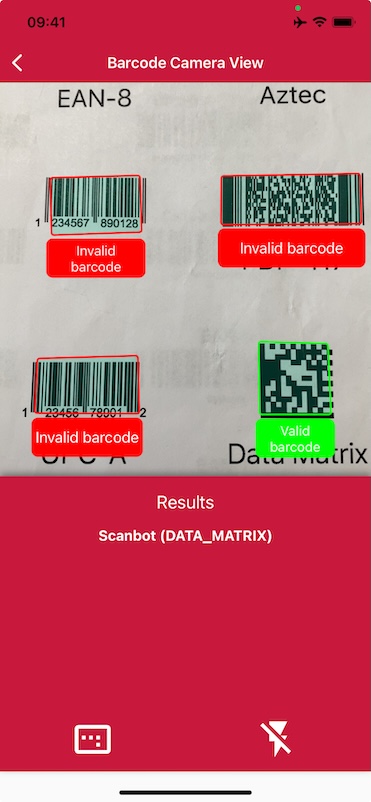
loading...
Want to scan longer than one minute?
Generate a free trial license to test the Scanbot SDK thoroughly.
Get free trial licenseScanbot SDK is part of the Apryse SDK product family
A mobile scan is just the start. With Apryse SDKs, you can expand mobile workflows into full cross‑platform document processing. Whether you need to edit PDFs, add secure digital signatures, or use a fast, customizable document viewer and editor, Apryse gives you the tools to build powerful features quickly.
Learn more
