Installing the .NET MAUI Barcode Scanner SDK
Overview
The Scanbot Barcode Scanner SDK is available in two NuGet packages:
- ScanbotBarcodeSDK.NET contains the Scanbot Barcode Scanner SDK .NET bindings and wrappers for Android and iOS platforms.
- ScanbotBarcodeSDK.MAUI is designed for compatibility with MAUI and provides portable wrappers for the Scanbot Barcode Scanner SDK.
Install ScanbotBarcodeSDK.MAUI if your project is based on MAUI, otherwise install ScanbotBarcodeSDK.NET.
You can install them directly via the Visual Studio IDE: Open your app solution in Visual Studio, select your iOS or Android project, and click on the menu item Project -> Add NuGet Packages.
Make sure nuget.org is selected as the source and search for the package.
By clicking on Add Package, the Scanbot Barcode Scanner SDK will be downloaded and installed in your project. Do this for both your iOS and Android projects.
Project settings
Required: TargetFrameworks
In a newly created MAUI project, the default configuration includes targeting multiple platforms such as Android, iOS, and macOS Catalyst.
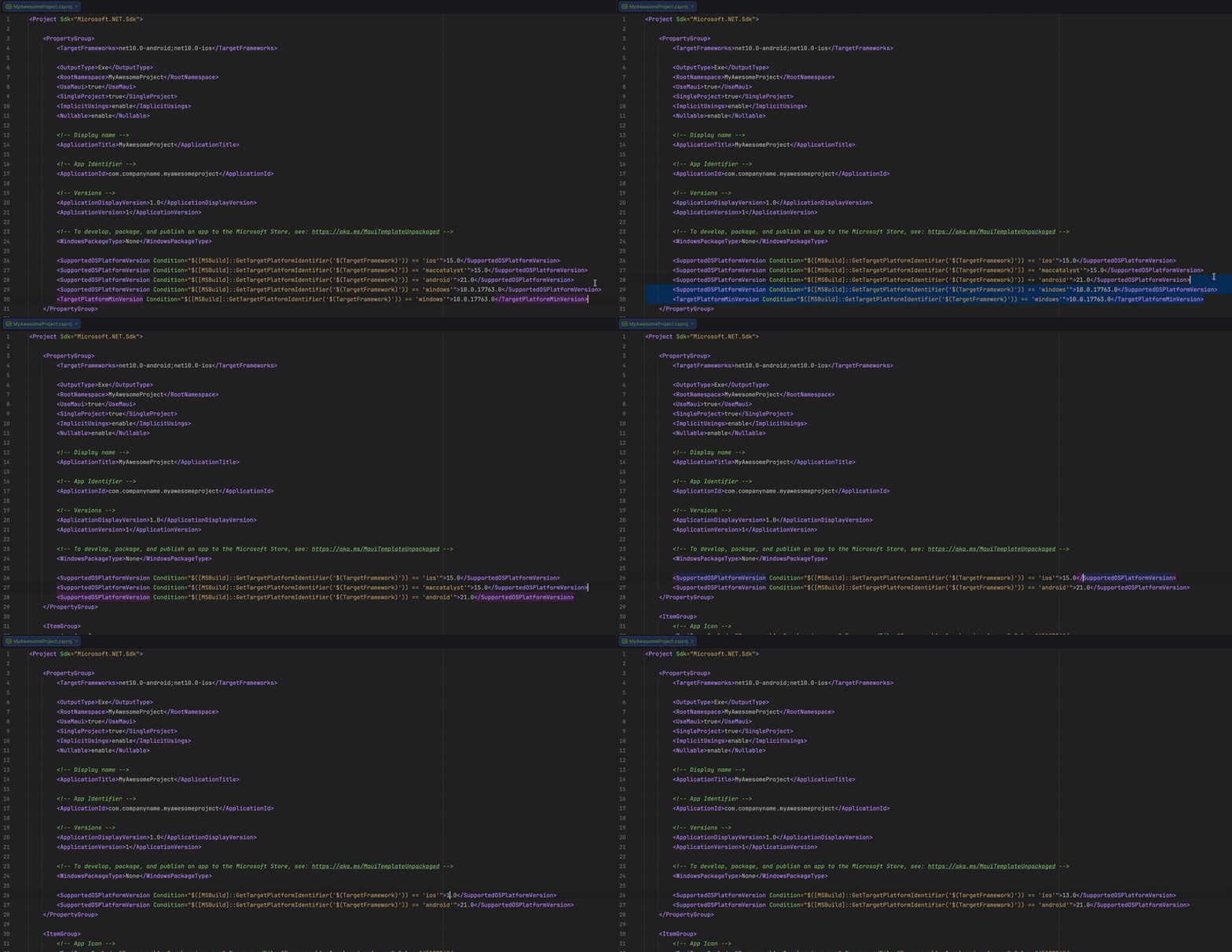
Adjust the TargetFrameworks setting to only include net10.0-android and net10.0-ios, removing unnecessary targets such as net10.0-maccatalyst and the conditional Windows target.
This ensures that the project focuses only on the supported platforms.

Required: Optimizing platform compatibility
In the default configuration of a newly created MAUI project, the <SupportedOSPlatformVersion> settings are initially configured to cater to various platforms including iOS, macOS Catalyst, Android, Windows, and Tizen.
However, since the Scanbot SDK NuGet package only supports Android and iOS, these settings need to be refined accordingly. Specifically, remove the conditions for macOS Catalyst, Windows, and Tizen, while updating the iOS version to 13.0.
This adjustment ensures that the project's configuration is tailored precisely to the supported platforms, enhancing compatibility and focus.
- Android
- iOS
Optional: ABI settings
The Scanbot Barcode Scanner SDK uses native libraries under the hood and supports the following
ABIs:
armeabi-v7a, arm64-v8a, x86 and x86_64.
Adjust the Supported ABIs configuration in your Android project settings accordingly:
Android Project => Options => Android Build => Advanced => Supported ABIs ...
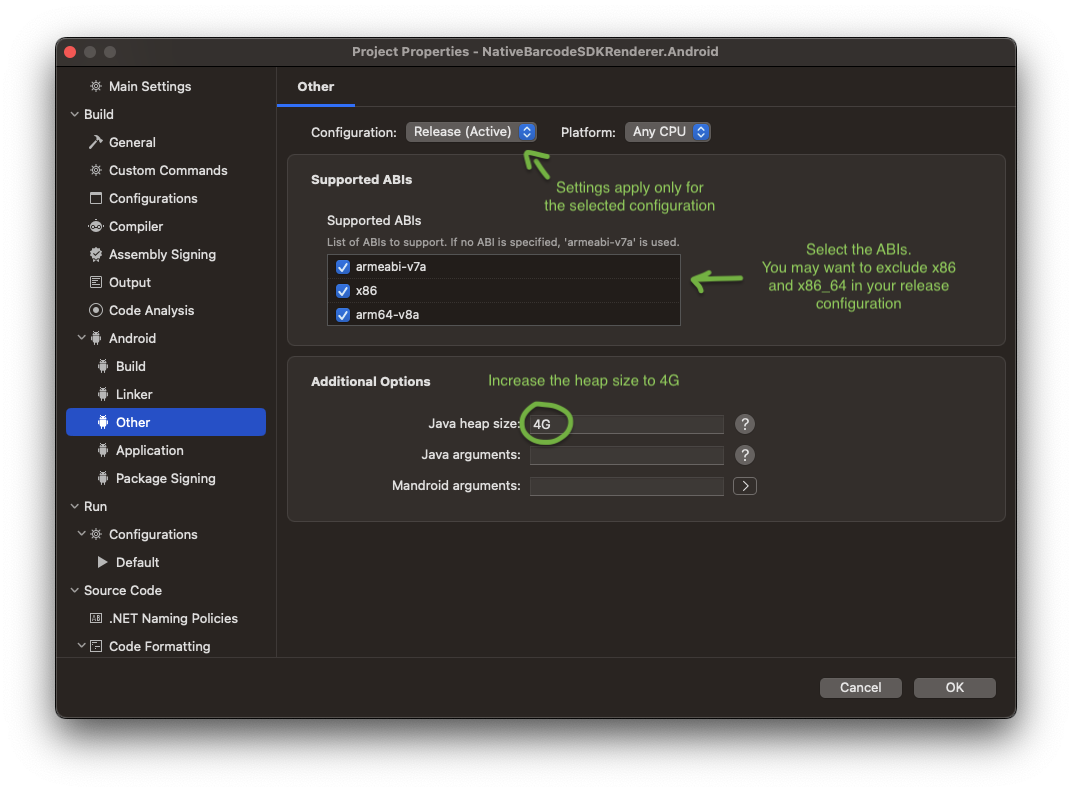
In most cases, the architectures x86 and x86_64 can be removed for the release (production) build, since they're only used on emulators and on some rare devices with the Intel Atom architecture.
Furthermore, increase the Java Heap Size value to 4G. This is required for the build process.
Optional: ProGuard
If you need to enable ProGuard for your Android release build, check the list of ProGuard rules for the Scanbot SDK.
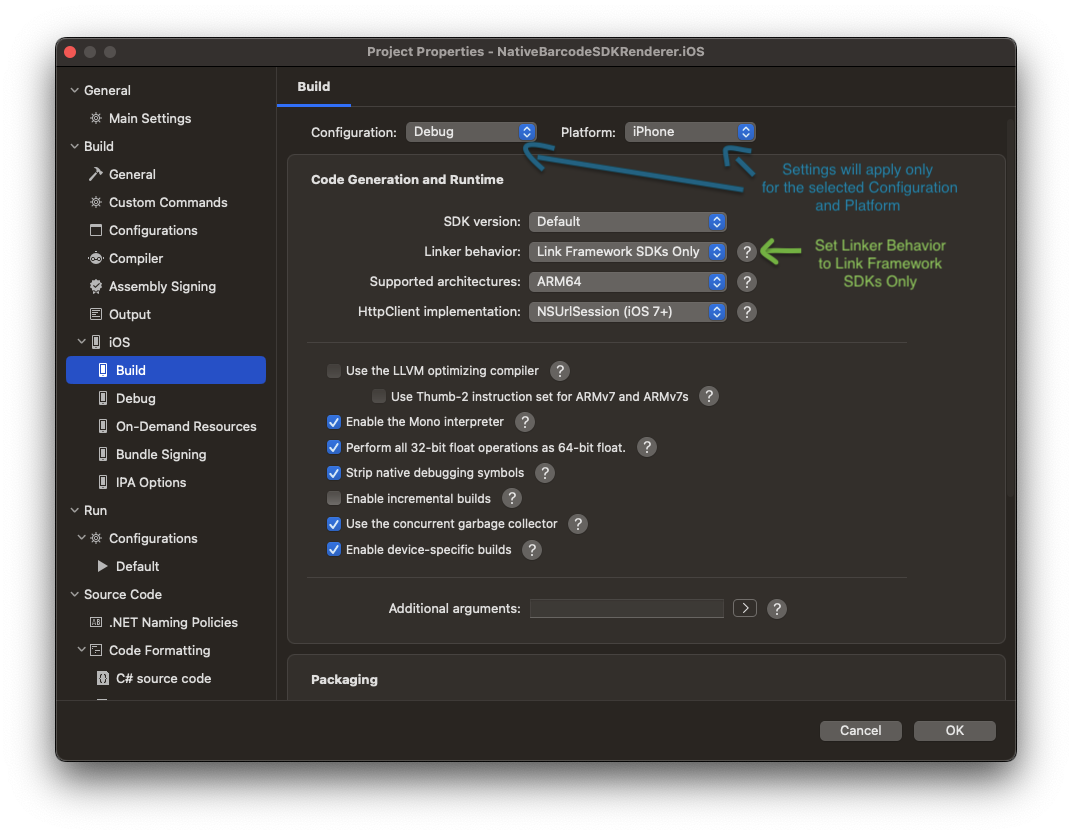
Set Linker behavior to
Link SDK assemblies only
Want to scan longer than one minute?
Generate a free trial license to test the Scanbot SDK thoroughly.
Get free trial licenseScanbot SDK is part of the Apryse SDK product family
A mobile scan is just the start. With Apryse SDKs, you can expand mobile workflows into full cross‑platform document processing. Whether you need to edit PDFs, add secure digital signatures, or use a fast, customizable document viewer and editor, Apryse gives you the tools to build powerful features quickly.
Learn more
